Turn GST invoices and bank statements into Excel registers
VLSHEETS helps accountants extract GST invoices, purchase bills, bank statements, and GSTR docs into Excel — with CA templates, AI extraction, and verify-before-write.
See extraction before you sign up
A mock run on a GST invoice. Nothing is uploaded and no credits are used.
Sharma Trading Co.
GSTIN 27AABCS1234F1Z5
| Description | HSN | Qty | Taxable | CGST | SGST | Total |
|---|---|---|---|---|---|---|
| Office Supplies | 4820 | 10 | 4,500.00 | 405.00 | 405.00 | 5,310.00 |
| Printer Cartridge | 8443 | 2 | 2,800.00 | 252.00 | 252.00 | 3,304.00 |
| Stationery Pack | 4820 | 5 | 1,200.00 | 108.00 | 108.00 | 1,416.00 |
Waiting to start…
| Description | Taxable | CGST | SGST | Total | Conf. | |
|---|---|---|---|---|---|---|
4-step wizard
Built for CA workflows inside Excel
Pick a CA template
Start with GST invoice, bank statement, purchase bill, or GSTR register templates.
Confirm schema
Review column headers and field guidance for accurate GST and accounting extraction.
Upload & extract
Drop GST invoices, bank statements, purchase bills, or GSTR PDFs for AI extraction.
Verify & write
Review extracted rows page-by-page before writing to your Excel register.
How it works
From signup to your first invoice register
Create your account, install the add-in in Excel on the web, then extract GST invoices and bank statements — all with one login.
Create account
Sign up free on the web to get 25 credits every month.
Install in Excel on the web
Download the manifest and upload it in Excel on the web, then sign in with the same account.
Extract
Upload GST invoices, bank statements, or purchase bills and verify results in Excel.
Install in Excel on the web
Download the manifest, then upload it in Excel on the web.
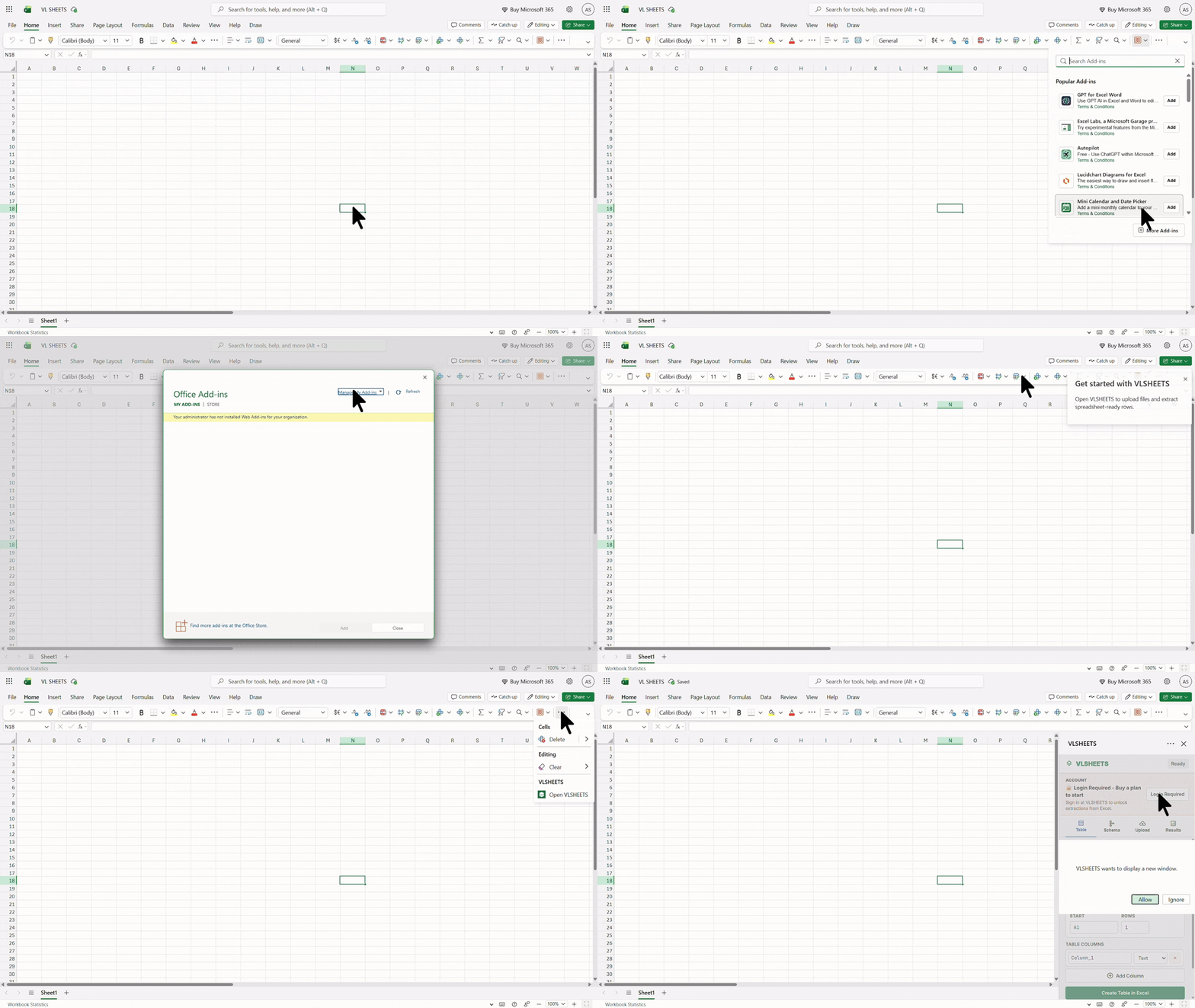
- 1Open excel.office.com and create or open a workbook
- 2Home → Add-ins → Upload My Add-in — upload the manifest you downloaded
- 3Click Open VLSHEETS on the ribbon and sign in with your account
Ready to stop manual data entry?
Start free with 500 units on us — try GST invoice and bank statement extraction with no subscription.